Folders, search and export for your AI chats.
Sidebarly adds folders, pins, tags, instant search, one-click Markdown and PDF export and a prompt library to Gemini and Claude on the web. It is all stored on your computer, not ours.
- No account
- No servers that see your chats
- 7-day Pro trial, no card
Pick the chat app you use. Or both.
Each app is a separate extension, so each one only asks for access to its own site.
Sidebarly Folders for Gemini
Gemini can search, pin, rename and delete chats, and since April 2026 it has Notebooks. It still has no folders, no tags and no way to export a single chat as a file. Sidebarly adds them.
- Nested folders and tags for every chat, not only recent ones
- Export a chat to Markdown or PDF in one click
- Prompt library in the Gemini composer: type //
Sidebarly Folders for Claude
Claude has Projects (five on a free account) and an account-wide data export sent by email. There are no folders, no tags and no export for a single chat. Sidebarly adds them.
- Folders and tags without using up your Projects
- Export any chat to Markdown or PDF, right from the page
- Instant title search, on every plan
Everything the sidebar should have had
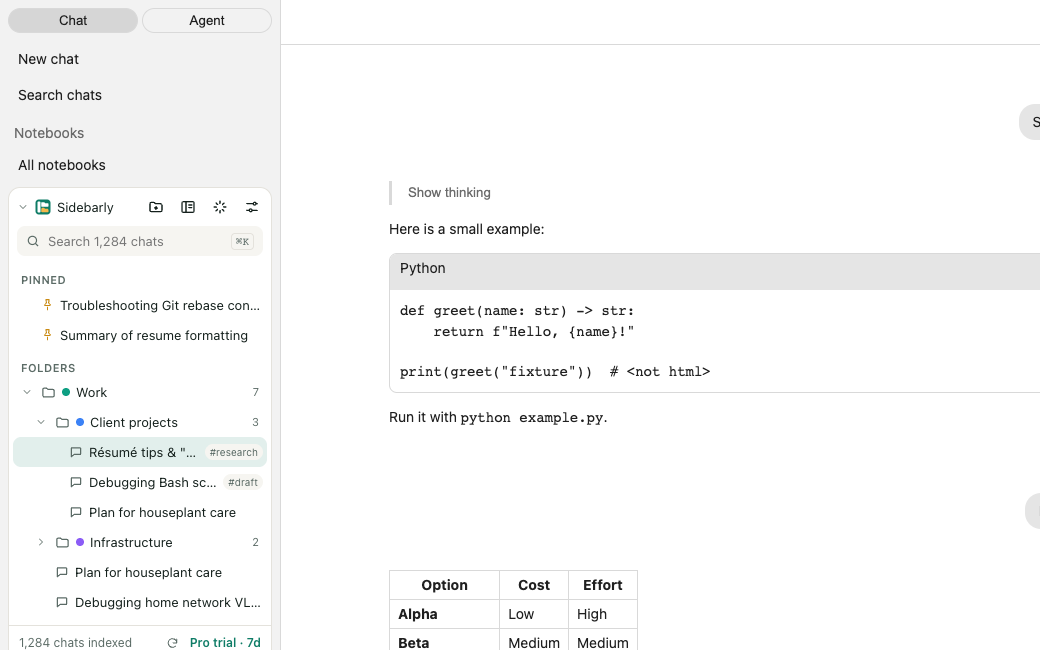
A small panel docks above the app's own chat list. The native list stays exactly as it was.
Folders
Drag chats into folders, nest them, color them. A chat stays where you put it.
Pins and tags
Keep the chats you reuse at the top. Tag the ones that belong to more than one topic.
Instant search
Titles and tags as you type. Pro also searches the text of chats you have opened.
Markdown and PDF export
One chat to a clean .md file or a PDF. Pro exports a whole folder as a zip.
Bulk delete
Select many chats, confirm once, and watch them go through the app's own delete menu.
Prompt library
Save prompts you reuse. Type // in the message box to drop one in.
Command palette
Press Ctrl K (Cmd K on a Mac; add Shift on Claude) to jump to any chat or folder.
Backup and restore
Save your folders to a file and load them anywhere. Free, on every plan.
It sees every chat, not just the ones in view
The sidebar in Gemini and Claude only loads your most recent chats until you scroll. Some folder extensions only see what happens to be loaded, often the first 30 or so, and lose the rest when you reload the page.
Sidebarly builds a full index once. Click Index all chats and it loads your whole list the way you would by scrolling (on Claude it reads your Recents page), then saves each title in your browser. After that it keeps up with new and renamed chats as they appear.
It is built for large histories: the index lives in the browser's own database with unlimited storage permission, so a thousand-plus chats do not run into the small storage quota that trips up some extensions.
chats indexed on this computer
An example of the count the panel shows once indexing finishes, so you can check it against your own history. If the number looks low, here is what to check.
Your chats never leave your browser
We did not build a cloud for your conversations, so there is nothing of yours on our side to leak, sell or lose.
Stored in Chrome, on your computer
Folders, pins, tags, prompts and the chat index live in Chrome's extension storage and IndexedDB. No account, no sign-up, no server that sees a title or a message.
Nothing runs behind your back
Sidebarly does not automate Gemini or Claude and never calls their internal APIs. It reads what is already on your screen, and every action starts with your click.
You hold the backup
Export a backup file whenever you like and restore it on any computer. Pro can also sync through your own Chrome sync, which we never see.
Details in plain language: privacy policy. This website has no cookies, analytics or trackers either.
Free for light use. Pro when you outgrow it.
Every install starts with a 7-day Pro trial. No card needed. When it ends, nothing you made is deleted.
Free
$0
- 5 folders, 10 pins, 5 tags
- Instant title search
- Markdown export, 5 per day
- 5 saved prompts
- Backup and restore
Pro
$4.99 per month
or $29 per year, or $59 once for lifetime
- Unlimited nested folders, pins and tags
- Search inside chats you have opened
- Unlimited Markdown, PDF and folder zip export
- Unlimited prompts with variables
- Sync across your Chrome browsers
Questions
Is Sidebarly free?
Yes. The free plan covers 5 folders, 10 pins, 5 tags, title search, 5 Markdown exports a day, 5 saved prompts and backup. Pro removes the limits and adds PDF export, search inside opened chats and sync. Every install gets 7 days of Pro first, with no card.
Can you see my chats?
No. Everything Sidebarly stores stays in your browser. There is no Sidebarly account and no server that receives your chat titles or messages. The only things that reach us are optional: payment details go to our payment provider if you buy Pro, and anonymous error reports (platform, version, error type) if you switch them on.
Does it change Gemini's or Claude's own sidebar?
No. Sidebarly shows its own panel above the app's chat list and leaves the native list alone. Nothing is hidden or reordered. Turn the extension off and the page looks exactly as it did.
Is it automating Gemini or Claude?
No. Both Google's and Anthropic's terms restrict automated access, and Sidebarly does not do it. It does not send requests to the apps on its own, does not call their internal APIs and does nothing in them behind your back. It shows you what is already on your screen, and each action (indexing, moving, exporting, deleting) starts when you click.
What happens when Gemini or Claude changes its website?
Sometimes a change breaks part of the panel. Every extension in this space hits this. The parts that find things on the page come from a small signed update file, so most fixes reach you the same day instead of waiting days for a store review. Your folders are never affected, because they are stored separately from the page.
I use both Gemini and Claude. Do I need both extensions?
Yes. They are separate extensions, each with access only to its own site, and each has its own Pro license. You can use the free plan on one and Pro on the other.
Which browsers does it work in?
Chrome on Windows, Mac, Linux and ChromeOS. Other browsers that install from the Chrome Web Store, such as Edge and Brave, will usually work, but we test in Chrome. Pro sync needs Chrome's own sync.
Give your chat history a shape
Install, click Index all chats, and start dragging. Setup takes a minute or two.