How to organize Claude chats into folders (2026)
Claude on the web gives you Projects, but no folders or tags. Projects are good at what they are built for, and free accounts can have five of them. Here is how far Projects go, and how to add folders when you need more.
What Claude offers natively
Based on Anthropic's help center as of September 2026:
- Projects are available to every account. Free accounts can create a maximum of five.
- Existing chats can be moved into a project with Add to project.
- Projects can be starred and archived.
- On the web you can select several chats and delete them at once.
- Searching past chats is a tool Claude itself uses on paid plans, rather than a search box that filters your chat list.
What is missing: folders, nesting, tags, and a way to group chats without giving them shared project context. One Reddit user also points out that once a chat is moved into a project, it cannot be searched from outside that project, so filing a chat can make it harder to find.
Organize with Projects (no extension)
If you have only a few areas of work, Projects alone can be enough.
-
Decide on your projects
On a free account you get five, so choose broad areas, for example Work, Writing, Code, Learning and Personal, rather than individual tasks.
-
Create each project
Open Projects in the sidebar and create a new project. Add a short description and any instructions or files that every chat in it should share.
-
Move existing chats in
Open a chat's menu and choose Add to project, then pick the project. Menu names can change; at the time of writing this is the option Anthropic documents.
-
Star the projects you use most
Starred projects are easier to reach. Archive projects you have finished so the list stays short.
-
Clear out old chats in bulk
Use multi-select in the chat list to delete throwaway conversations several at a time.
Keep in mind
Project instructions and files apply to every chat in the project. That is the point of a project, but it means a project is not a neutral box: a chat filed there behaves differently from one that is not.
Organize with folders (Sidebarly)
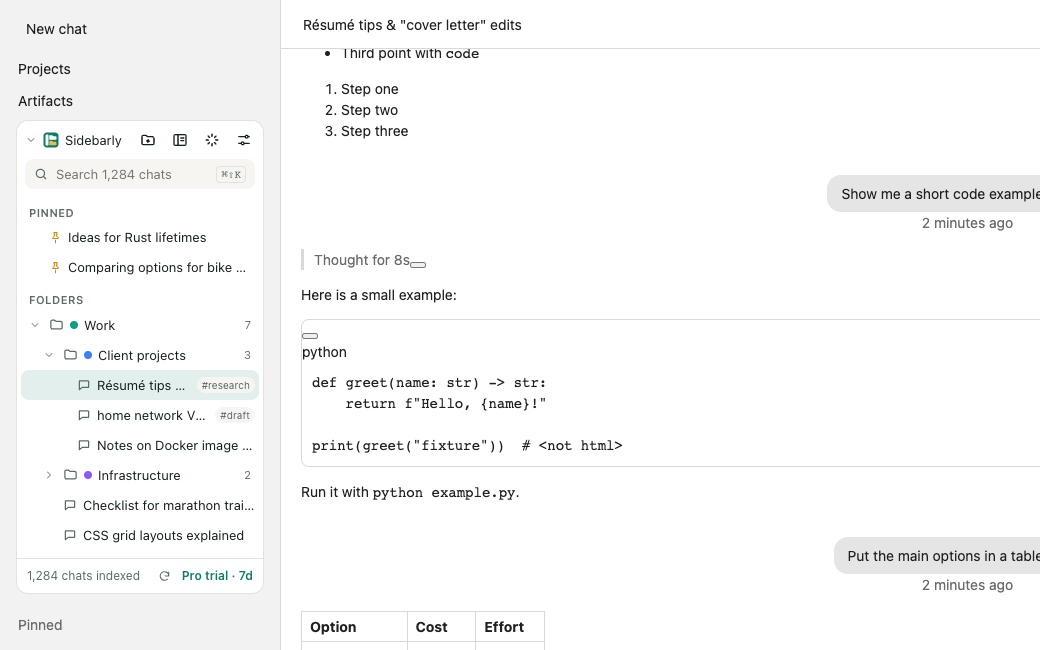
Sidebarly Folders for Claude is a Chrome extension that adds a panel above Claude's own chat list. Folders are labels stored in your browser: filing a chat does not move it, change its context, or affect your projects.
-
Install and open Claude
Add Sidebarly Folders for Claude from the Chrome Web Store, then open or reload claude.ai. The Sidebarly panel appears at the top of the sidebar; Claude's own list stays untouched below it.
-
Click "Index all chats" once
The sidebar shows only recent chats. Sidebarly reads your full chat list from Claude's Recents page, the same page you can open yourself, and saves each title and id locally. The panel then shows "N chats indexed" and picks up new and renamed chats as you go.
-
Create folders
Click New folder (+). The free plan includes 5 folders; Pro adds unlimited folders and nesting, such as Code, then Client A and Client B.
-
File your chats
Drag a chat from Claude's sidebar onto a folder, or open Move to folder from the chat's menu inside the Sidebarly panel.
-
Pin and tag
Pin chats you return to often; they appear in the panel's Pinned section. Add tags for themes that cut across folders.
-
Search and jump
Search titles and tags from the panel, or press Ctrl K (Cmd K on a Mac) to open any chat or folder in a few keystrokes. Pro adds "Also search inside chats I have opened".
Sidebarly works alongside Projects. A chat can be in a project and in a Sidebarly folder at the same time. The extension never calls Claude's internal APIs and never acts on its own; it reads what is on your screen and every action starts with your click. Your folders, pins and tags stay on your computer. Keep a copy with Settings, Back up; see backup and restore.
Projects or folders?
| Claude Projects | Sidebarly folders | |
|---|---|---|
| Purpose | Shared instructions and files | Filing and finding |
| Limit on free accounts | 5 projects | 5 folders (unlimited on Pro) |
| Nesting | No | Yes (Pro) |
| Tags | No | Yes |
| Changes the chat's context | Yes | No |
| Works on mobile | Yes | No, desktop Chrome |
A good rule: use a project when chats need the same background material; use a folder when you only want to find them again.
FAQ
Does Claude have folders?
Not as of September 2026. Claude has Projects, which can hold chats, but they are built for shared instructions and files and free accounts are limited to five.
Will Sidebarly move my chats into or out of projects?
No. Sidebarly does not change your chats or projects. Folders are local labels in your browser.
Why does the index show fewer chats than I expected?
Open Claude's Recents page and check that your older chats appear there, then click Index all chats again. The support page covers other causes.
Is my chat content sent anywhere?
No. Titles, folders and any text used for search stay in your browser. Sidebarly has no server that receives your chats. See the privacy policy.
Add folders to Claude
Nested folders, pins, tags, search and export, stored on your computer. Free to start, 7-day Pro trial, no card.