Folders for Claude, without spending your Projects.
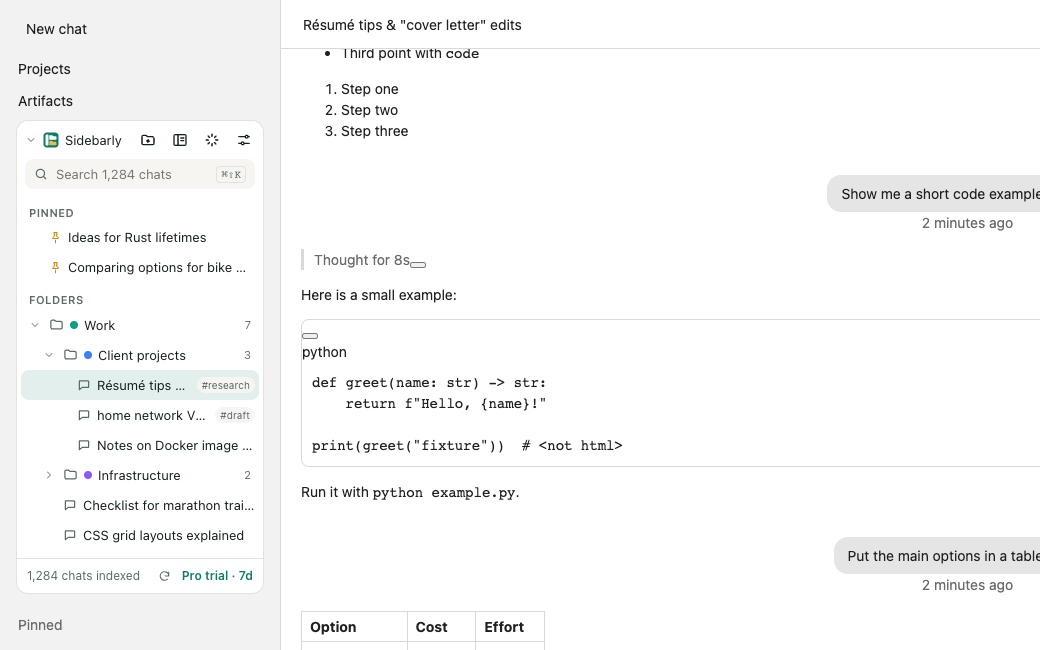
Sort Claude chats into folders, pin and tag them, search every title instantly and export any conversation to Markdown or PDF. It all stays in your browser.
- Indexes your whole chat list
- No account
- 7-day Pro trial, no card
What Claude does, and what Sidebarly adds
Claude groups work into Projects, and a free account can create up to five. Projects are great for shared files and instructions, but they are not folders: there are no tags, no per-chat export and, on the free plan, no chat search.
| Task | Claude, as of September 2026 | With Sidebarly |
|---|---|---|
| Group chats | Projects; free accounts can create 5 | Folders that do not count against Projects; nested on Pro |
| Tags | None | Yes, and a chat can carry several |
| Pin and star | Projects can be starred | Pin any chat to the panel's Pinned section |
| Search | Chat search is a tool Claude uses on paid plans | Instant title and tag search on every plan; Pro adds the text of chats you have opened |
| Export | Whole account only, by an emailed link that expires in 24 hours | One chat to Markdown or PDF in one click; Pro adds a whole folder as a zip |
| Delete many chats | Multi-select on the web | Also by folder or from search results, through Claude's own delete menu |
| Prompt library | None | Saved prompts, inserted with // in the message box |
| Jump to any chat | Scroll or open Recents | Ctrl Shift K palette (Cmd Shift K on a Mac) |
Claude's side is based on Anthropic's Claude help center as of September 2026. Anthropic can add features at any time; we will update this table when it does.
Every chat in your Recents, indexed
Claude's sidebar shows a short list of recent chats. The full list lives on the Recents page. Click Index all chats and Sidebarly reads your chat list from that page, the same list you can open yourself, and saves each title and link in your browser.
From then on it notices new and renamed chats as they appear. The panel shows how many chats it has indexed, so you can check it against your own history.
Chats you move into folders stay wherever they are in Claude. A chat can sit in a Project and in a Sidebarly folder at the same time.
Projects for context, folders for order
Keep using Projects for work that needs shared files and custom instructions. Use folders for everything else: sorting, finding and cleaning up.
Drag and drop
Drag a chat from Claude's list onto a folder in the panel, or use Move to folder from the chat's menu inside the panel.
Search on the free plan too
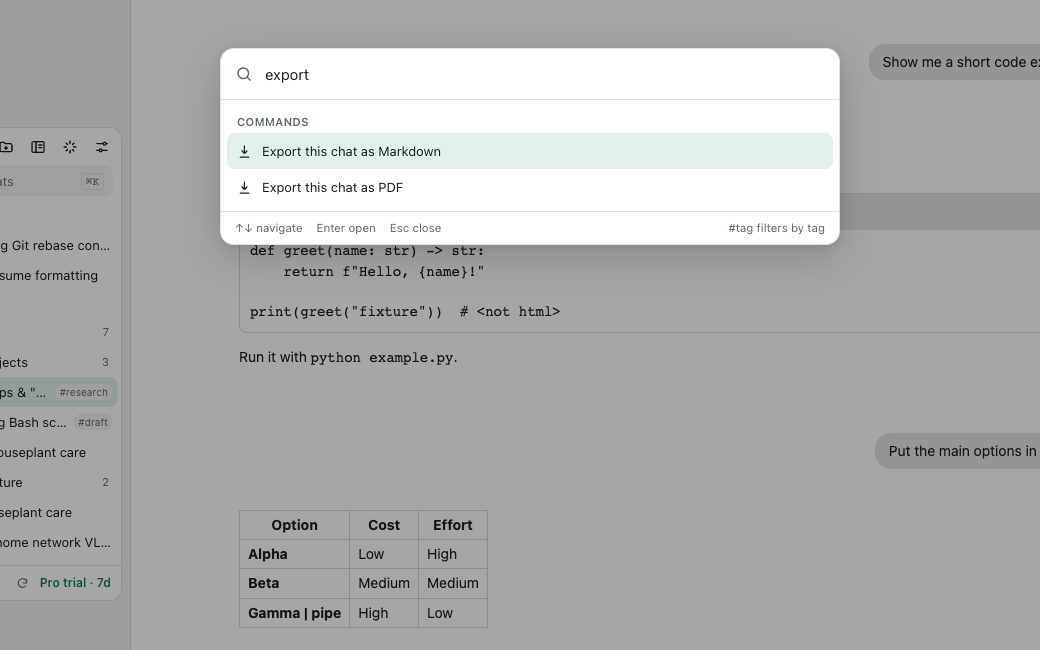
Type in the panel and matching titles and tags appear as you type. Pro also finds words inside chats you have opened.
Claude's list untouched
The panel sits above Claude's own list in a sealed-off layer. Nothing native is hidden, moved or restyled.
Step by step: how to organize Claude chats into folders.
Export one Claude chat, not your whole account
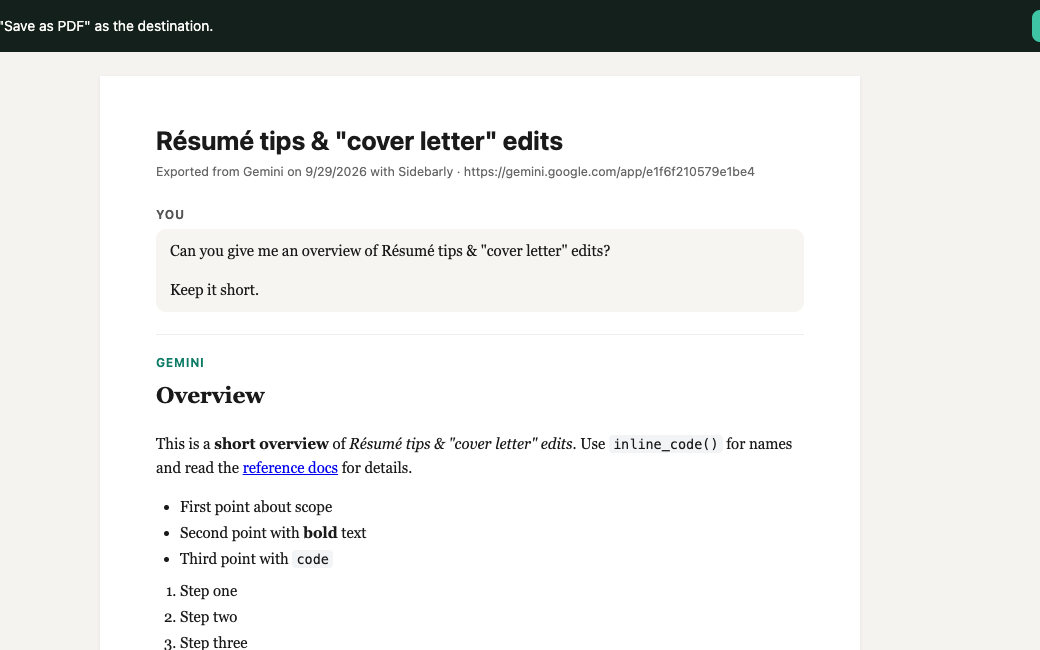
Claude's own export sends a link to your entire account's data by email. When you only need one conversation, open it and click Export in the panel.
Markdown gives you a clean .md file with your messages and Claude's replies, including headings, lists, tables and code blocks. PDF opens a tidy print view and Chrome's Save as PDF. Free includes 5 Markdown exports a day; Pro is unlimited and adds PDF and whole-folder zips.
All the ways to export a Claude chat, with and without an extension.
Reuse your best prompts
Save the prompts you type again and again. In Claude's message box, type // and pick one. Pro adds variables such as Review this {{language}} code for {{goal}}, filled in each time.
Clean up by folder
Claude already lets you select several chats to delete. Sidebarly adds selecting by folder or from search results. After you confirm, it uses Claude's own delete menu for each chat, in front of you, and you can stop at any time.
Stored on your computer, not ours
- Folders, pins, tags, prompts and the chat index stay in Chrome on your computer.
- The extension can only access claude.ai, plus one small update file from sidebarly.com.
- No account. No analytics. Error reports are off unless you turn them on, and never include chat content or titles.
- No automation: Sidebarly never calls Claude's internal APIs or acts on its own. It reads what is on your screen and acts when you click.
Claude folders FAQ
Does Claude have folders?
Not as such. Claude has Projects, which hold shared files and instructions for a set of chats, and free accounts can create up to five. Sidebarly adds plain folders and tags on top, and they do not use up any Projects.
Can a chat be in a Project and a folder?
Yes. Sidebarly folders only exist in your browser and do not move anything inside Claude, so a chat stays in its Project and can also sit in a folder.
How do I export a single Claude chat?
Open the chat and click Export in the Sidebarly panel, then choose Markdown or PDF. Without an extension, you can copy messages one by one or request Claude's account-wide export, which arrives as an emailed link. Full guide.
Does it work with Claude's free plan?
Yes. Sidebarly works the same on free and paid Claude accounts, and its title search works on both, even though Claude's own chat search is limited to paid plans.
Does it use Claude's API or my messages allowance?
No. Sidebarly does not send messages to Claude and never calls Claude's internal APIs. It reads the page you already have open, so it has no effect on your usage limits.
Does it work in the Claude desktop or mobile apps?
No. It is a Chrome extension for claude.ai in the browser, on Windows, Mac, Linux and ChromeOS.
In Chrome Web Store review
Sidebarly Folders for Claude has been submitted to the Chrome Web Store and is waiting for review. Reviews usually take a few days and sometimes a few weeks. Check back here: the buttons on this page turn into install links as soon as it is approved.
Questions in the meantime? Email support@sidebarly.com.